
See what your energy is doing, and use it on your own terms
FoxCloud and the mySigen app show your solar, battery, grid and home use, live. Time of use and demand charges, explained in plain words, and a plan built around your own bill.
Start an assessmentBuying solar without a plan for your power bill
Does this sound familiar?
An energy manager is the part of your system that watches, plans and reports. It is not just the panels and the battery.
We help homes and businesses use their own solar and cheapest hours on their own terms
Many people with solar still do not know which hours cost them the most, and many businesses get a demand charge that nobody has explained.
FoxCloud and the mySigen app do three things, every day. Load shifting: charge the battery from solar or from cheap grid power, then use that stored power at the priciest hours instead of buying from the grid. Peak shaving: hold some of the battery back in reserve, so it can cover a business's highest half hour of demand and lower that month's demand charge. Monitoring: show you solar, battery, grid and home use, live, on one screen, so you always know what your system is doing.
These three things work every ordinary day. This is control over your own supply: using your own solar, and your cheapest hours, on your own terms.
Every FoxESS and Sigenergy system we install comes with its own app, FoxCloud or mySigen, and our free energy assessment reviews your real bill, including your demand charges.
And we can do the same for you.
FoxCloud is FoxESS's own app. The mySigen app is Sigenergy's. See the full rundown on each brand at FoxESS and Sigenergy, or compare every option on the technology hub.
Time of use, in plain words
A time of use tariff prices electricity differently depending on the time of day, instead of one price all day. Eskom splits the day into peak, standard and off-peak periods, and the exact hours shift between a high demand season (winter) and the rest of the year.
Homeflex is Eskom's own residential time of use tariff. If Eskom supplies your home directly and you have rooftop solar, Eskom requires you to be on Homeflex. Megaflex and Miniflex are the equivalent time of use tariffs for larger and smaller businesses. The exact peak, standard and off-peak hours for each season are set out on Solar Power Backup.
Time of use pricing only helps if your own usage pattern actually suits it. If most of your load already falls outside peak hours, moving things around will not change much. The free energy assessment looks at your real bill to check whether this applies to you, rather than assuming it does.

Load shifting and peak shaving: not the same job
Both use a battery. They are not aimed at the same line on your bill.
| Load shifting | Peak shaving | |
|---|---|---|
| What it targets | Your energy charge, paid per kWh you use | Your demand charge, paid on your highest kVA |
| What triggers it | The time of day | Approaching a limit you set |
| Who it helps most | Anyone on a time of use tariff | Businesses with a demand or kVA charge |
| What the battery does | Charges cheap, discharges at the priciest hours | Holds back reserve, discharges only near the limit |
A battery can do both jobs, but a system is usually set up to prioritise one. Peak shaving needs reserve capacity held back for the one half hour that matters most. Using that same reserve for everyday load shifting can leave less of it ready when the real peak arrives. The free energy assessment works out which balance suits your own load.
What a demand (kVA) charge actually is
Many business electricity tariffs bill two separate things: energy, in kWh, for what you use, and demand, in kVA, for your highest use. Eskom calls this your chargeable demand: the highest average power draw measured over any 30-minute period in the billing month. It is your highest half hour, not one split-second spike. A short spike only matters if it lifts your average for that half hour high enough to become the month's highest.
On Eskom's Megaflex tariff, this demand charge applies during peak and standard hours, not off-peak. On Miniflex, the same cost is folded into a cents-per-kWh rate instead of billed as its own line.
A battery cannot make this charge disappear. What it can do is cover part of your highest half hour, so the recorded figure is lower.
A worked example: peak shaving a business's demand
Example only, your numbers will differ. This shows the mechanic only, not a real client's numbers.
| Without battery help | With the battery covering part of the peak half hour | |
|---|---|---|
| Grid draw during the peak half hour | 90 kVA | 70 kVA |
| Battery supplying the rest | 0 kVA | 20 kVA |
| Recorded chargeable demand for the month | 90 kVA | 70 kVA |
The battery in this example is sized to reliably cover that kind of half hour. Your own battery is sized around your own highest half hours, which is exactly what the free energy assessment works out from your real bill.
Solar helps too, but only during the day. Many demand peaks fall early in the morning or late in the evening, outside the strongest sun hours. Solar alone rarely solves a demand-charge problem the way a battery can.
Which of these fits you?
| Your situation | Does time of day matter? | Does a demand (kVA) charge apply? | What an energy manager mostly does for you |
|---|---|---|---|
| Home on one price all day | No | Usually not | Monitoring: see your solar, battery and grid use in the app |
| Home on time of use (Homeflex) | Yes | Usually not | Load shifting: charge cheap, use stored power at the priciest hours |
| Business on time of use | Yes | Sometimes | Load shifting, plus trends you can track over time |
| Business with a big demand charge | Yes | Yes | Peak shaving, plus load shifting, both together |
Not sure which row you fall into? The free energy assessment reviews your actual bill and tells you.
Seeing your system, live
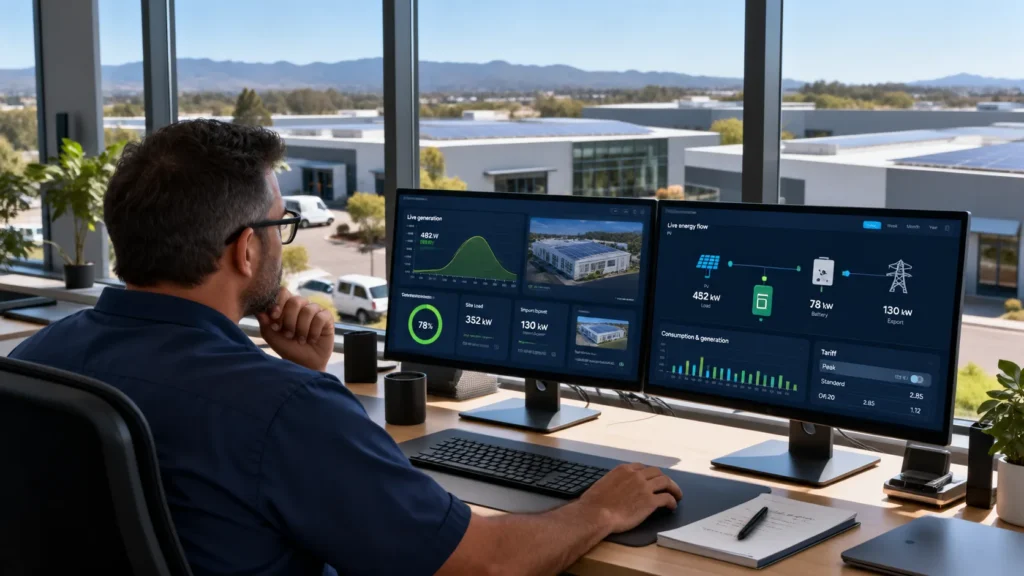
FoxCloud and the mySigen app both show your solar, battery, grid and home use on one live screen. FoxCloud also shows trends by day, week, month and year. The mySigen app shows a live energy flow diagram, refreshed every ten seconds.
You can see exactly what your system is doing, right now and over time, instead of guessing.
If something needs attention, the app shows a plain alert. The owner gets pop-up notifications in the app, so you hear about it first.
Charging cheap, using it at the priciest hours
FoxESS lets you set a schedule, called Mode Scheduler, so the system charges at off-peak times and discharges at the priciest hours. Sigenergy's own version is called Sigen AI Mode. It looks at the weather forecast, your usual use and the time of use price. Then it plans when the battery charges and discharges.
More of your day runs on power you already paid less for, without you having to switch anything by hand.
This works every ordinary day, on any time of use tariff, not only as a backup plan.
Covering your highest half hour
FoxESS names this setting Peak Shaving. Sigenergy calls its own version AI Peak Shaving. Either way, the battery holds reserve back and only steps in once your draw from the grid passes a limit you choose.
Your demand charge is billed on your highest half hour of the month, so a battery covering part of that half hour can lower the recorded figure.
The battery is doing a specific job at a specific moment, worked out from your own load, not just running down all day.
Switching chosen loads from the app
FoxESS and Sigenergy systems can both switch chosen loads, such as a geyser or a pool pump. You can do it on a schedule or in real time, from the app or through the energy gateway, with a compatible smart switch.
Those loads can run when power is cheapest, or when there is spare solar, without you setting a manual timer by hand.
You get less fiddling with plug timers, and loads that quietly line up with the cheapest moment to run.
Export limit: when a city will not take your extra power
FoxCloud has an Export Limit setting. The mySigen app has an Export Power limit, and a separate setting to Block Battery export altogether.
If your city or municipality caps how much solar you can send back to the grid, your system can be set to stay inside that cap.
The extra power does not have to just be capped and left. It can be routed to other loads on site first, such as a geyser or pool pump on a compatible smart switch. This needs your site to be set up for it. See SigenStor Neo for these settings on that model.
Battery safety
FoxESS and Sigenergy batteries both use LFP (lithium iron phosphate) cells, built with safety checks that run all the time. The full detail on chemistry and protection is on Solar Power Backup.
Built around your own bill, not a guess
Every energy management plan starts with the free energy assessment: a review of your bill, including your demand charges, with on-site logging for bigger sites. The logger stays 1 to 2 weeks. You get a PDF report plus a walk-through, showing your recommended system size, equipment list and payback time. See Services and Energy assessment.

Not sure which of your hours are actually costing you the most?
Get your bill reviewedHow we set up your energy management plan
1
Book the free energy assessment
We review your bill, including your demand charges, and for bigger sites we can log your actual usage on site. The logger stays 1 to 2 weeks.
2
Get your report
A PDF report plus a walk-through, showing your recommended system size, equipment list and payback time, about 1 to 2 weeks from booking.
3
We install and set up your energy manager
Your app shows solar, battery and grid live, and the settings are set around your own bill. Installed by our team and preferred, vetted installers approved by the brands, with CoC and SSEG application handled for you, and backed by a 10-year swap-out warranty.
Why let ZenSolar set up your energy management?
With us
- A free assessment that reviews your actual bill and demand charges
- Plain explanations of what each app setting does for your bill
- CoC and SSEG application handled for you
- Pop-up alerts in the app, so you know what is happening
- Backed by a 10-year swap-out warranty
With them
- A system sized on a guess, not your real bill
- Settings nobody explained
- Paperwork left to you
- No clear way to see what your system is doing
- No clear warranty behind the equipment
Frequently asked questions
It watches, plans and reports. Load shifting moves your use to cheaper hours. Peak shaving helps cover your highest half hour of demand. Monitoring shows you solar, battery, grid and home use live, so you can see what your system is doing.
A time of use tariff prices electricity differently by time of day, instead of one price all day. Homeflex is Eskom's residential time of use tariff, required for homes that Eskom supplies directly and that have rooftop solar. Megaflex and Miniflex are the equivalent tariffs for businesses.
Off-peak hours are the cheapest, usually overnight, with weekends carrying little or no peak pricing at all. A battery can charge in those cheap hours and discharge again once the priciest hours start, which is exactly what load shifting means. See Solar Power Backup for the exact hours by season.
Load shifting targets your energy charge, moving use to cheaper hours. Peak shaving targets your demand charge, holding the battery in reserve to cover your highest half hour. A battery can do both, but a system is usually set up to prioritise one.
It is your highest half hour average power draw in the billing month, not one split-second spike. A battery covering part of that half hour can lower the recorded figure. It cannot make the charge disappear altogether.
Yes. A hybrid inverter can charge your battery from the grid as well as from your panels. So you can top up during cheap off-peak hours, or in a long cloudy spell, not only from sunlight.
A battery can, by covering part of your highest half hour so the recorded figure is lower. Solar helps less here, because many demand peaks fall early morning or evening, outside the strongest sun hours.
Not on its own. Your notified maximum demand is a formal figure agreed with your utility, and changing it needs a formal request. A battery can lower your measured, chargeable peak each month it succeeds in covering your highest half hour, which is a different thing.
Not fully. Solar covers daytime load well, but many demand peaks happen outside strong solar hours, early morning or evening. A battery, not solar alone, is what covers those moments.
FoxCloud and the mySigen app both show your solar, battery, grid and home use, live, on one screen. FoxCloud also shows trends by day, week, month and year. If something needs attention, you get a plain alert as a pop-up notification in the app.
Yes, on a compatible smart switch. Both FoxESS's and Sigenergy's systems can switch chosen loads on a schedule or in real time, so they can run when power is cheapest or when there is spare solar.
Your system can be set with an export limit, so it stays inside whatever cap your city or municipality allows. The extra power does not have to go to waste. If your site is set up for it, it can go to other loads first, such as a geyser or pool pump.
FoxESS and Sigenergy inverters generally support more than one way to connect: WiFi built in, plus LAN or a 4G option on many models. If WiFi is weak in your plant room, a wired LAN connection or a 4G dongle is usually the fix. The free energy assessment can flag this before your system is installed.
Mostly larger businesses on demand-billed tariffs like Megaflex. If you are not sure which tariff you are on, the free energy assessment checks your bill for you.
Not ready for a full assessment? Contact us and we will answer your questions first.